The bug reported by 'michi at marel dot at' also exists in PHP version 5.1.1. This functions just works with vertical lines!imagedashedline
(PHP 4, PHP 5, PHP 7, PHP 8)
imagedashedline — Zeichnet eine gestrichelte Linie
Beschreibung
Diese Funktion ist veraltet. Stattdessen sollte eine Kombination von imagesetstyle() und imageline() verwendet werden. 0,0 ist die obere linke Ecke des Bildes.
Parameter-Liste
-
image Ein GdImage-Objekt, das von einer der Funktionen zur Bilderzeugung, z. B. imagecreatetruecolor(), zurückgegeben wurde.
x1-
x-Koordinate des ersten Punktes.
y1-
y-Koordinate des ersten Punktes.
x2-
x-Koordinate des zweiten Punktes.
y2-
y-Koordinate des zweiten Punktes.
color-
Die Füllfarbe. Eine Farbkennung, die mit imagecolorallocate() erzeugt wurde.
Rückgabewerte
Gibt immer true zurück.
Changelog
| Version | Beschreibung |
|---|---|
| 8.0.0 |
image erwartet nun eine
GdImage-Instanz; vorher wurde eine gültige
gd-Ressource erwartet.
|
Beispiele
Beispiel #1 imagedashedline()-Beispiel
<?php
// Erzeuge ein 100x100-Bild
$im = imagecreatetruecolor(100, 100);
$white = imagecolorallocate($im, 0xFF, 0xFF, 0xFF);

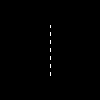
// Zeichne die vertikale gestrichelte Linie
imagedashedline($im, 50, 25, 50, 75, $white);

// Speichere das Bild
imagepng($im, './dashedline.png');
?>
Das oben gezeigte Beispiel erzeugt eine ähnliche Ausgabe wie:
Beispiel #2 Alternative zu imagedashedline()
<?php
// Erzeuge ein 100x100-Bild
$im = imagecreatetruecolor(100, 100);
$white = imagecolorallocate($im, 0xFF, 0xFF, 0xFF);

// Definiere den gewünschten Stil: die ersten 4 Pixel sind weiß und die
// nächsten 4 sind transparent. Dies erzeugt den Effekt einer gestrichelten Linie
$style = Array(
                $white,
                $white,
                $white,
                $white,
                IMG_COLOR_TRANSPARENT,
                IMG_COLOR_TRANSPARENT,
                IMG_COLOR_TRANSPARENT,
                IMG_COLOR_TRANSPARENT
                );

imagesetstyle($im, $style);

// Zeichne die vertikale gestrichelte Linie
imageline($im, 50, 25, 50, 75, IMG_COLOR_STYLED);

// Speichere das Bild
imagepng($im, './imageline.png');
?>
Siehe auch
- imagesetstyle() - Set the style for line drawing
- imageline() - Zeichnet eine Linie
+add a note
User Contributed Notes 5 notes
ProfessorNeo at gmx dot de 
20 years ago
tgabor72 at freemail dot hu 
16 years ago
You can use the imagepatternedline() function with extra features instead of imagedashedline() to give a visible dashedlines and other any kind of patterned lines on your images. The routine also manages the thickness of the line. Have fun!

<?php
// imagepatternedline() function
// Routine was developed to draw any kind of straight line with thickness. Routine uses imageline() function to draw line.
// Parameters are (similar to imageline() function):
//   $image: (resource) imagefile
//   $xstart, $ystart: (int) x,y coordinates for first point
//   $xend, $yend: (int) x,y coordinates for last point
//   $color: (int) color identifier that created with imagecolorallocate()
// extra parameters:
//   $thickness: (int) thickness of line in pixel
//   $pattern: (string) pattern of line, which repeats continuously while line is being drawed.
//   If there is '1' in the pattern that means the actual dot of line is visible,
//   '0' means dot is not visible (space between two line elements).
//   All characters regard for one pixel. Default: 1 dot wide dashed line with 4-4 dots and spaces.
// Examples for pattern:
// "1" or "" continuous line
// "10" close dotline
// "10000" dotline
// "111111110000001100000011111111" dotline for design drawing
// "111111111100000011000000110000001111111111" double dotline
// some examples for using imagepatternedline():
// imagepatternedline($image,300,300,442,442,$color,200,""); // a square with 200 length of edge and rotated 45 degrees
// imagepatternedline($image,100,200,289,200,$color,100,
//  "11001100000011001111000011001111110000001100001100"
// ."00001111001100111100000011000000110000110011001100"
// ."11000011111100111111000011001111001111000011110000"
// ."1111001111110011000011000000001100110011"); // barcode

function imagepatternedline($image, $xstart, $ystart, $xend, $yend, $color, $thickness=1, $pattern="11000011") {
   $pattern=(!strlen($pattern)) ? "1" : $pattern;
   $x=$xend-$xstart;
   $y=$yend-$ystart;
   $length=floor(sqrt(pow(($x),2)+pow(($y),2)));
   $fullpattern=$pattern;
   while (strlen($fullpattern)<$length) $fullpattern.=$pattern;
   if (!$length) {
      if ($fullpattern[0]) imagefilledellipse($image, $xstart, $ystart, $thickness, $thickness, $color);
      return;
   }
   $x1=$xstart;
   $y1=$ystart;
   $x2=$x1;
   $y2=$y1;
   $mx=$x/$length;
   $my=$y/$length;
   $line="";
   for($i=0;$i<$length;$i++){
      if (strlen($line)==0 or $fullpattern[$i]==$line[0]) {
         $line.=$fullpattern[$i];
      }else{
         $x2+=strlen($line)*$mx;
         $y2+=strlen($line)*$my;
         if ($line[0]) imageline($image, round($x1), round($y1), round($x2-$mx), round($y2-$my), $color);
         $k=1;
         for($j=0;$j<$thickness-1;$j++) {
            $k1=-(($k-0.5)*$my)*(floor($j*0.5)+1)*2;
            $k2= (($k-0.5)*$mx)*(floor($j*0.5)+1)*2;
            $k=1-$k;
            if ($line[0]) {
               imageline($image, round($x1)+$k1, round($y1)+$k2, round($x2-$mx)+$k1, round($y2-$my)+$k2, $color);
               if ($y) imageline($image, round($x1)+$k1+1, round($y1)+$k2, round($x2-$mx)+$k1+1, round($y2-$my)+$k2, $color);
               if ($x) imageline($image, round($x1)+$k1, round($y1)+$k2+1, round($x2-$mx)+$k1, round($y2-$my)+$k2+1, $color);
            }
         }
         $x1=$x2;
         $y1=$y2;
         $line=$fullpattern[$i];
      }
   }
   $x2+=strlen($line)*$mx;
   $y2+=strlen($line)*$my;
   if ($line[0]) imageline($image, round($x1), round($y1), round($xend), round($yend), $color);
   $k=1;
   for($j=0;$j<$thickness-1;$j++) {
      $k1=-(($k-0.5)*$my)*(floor($j*0.5)+1)*2;
      $k2= (($k-0.5)*$mx)*(floor($j*0.5)+1)*2;
      $k=1-$k;
      if ($line[0]) {
         imageline($image, round($x1)+$k1, round($y1)+$k2, round($xend)+$k1, round($yend)+$k2, $color);
         if ($y) imageline($image, round($x1)+$k1+1, round($y1)+$k2, round($xend)+$k1+1, round($yend)+$k2, $color);
         if ($x) imageline($image, round($x1)+$k1, round($y1)+$k2+1, round($xend)+$k1, round($yend)+$k2+1, $color);
      }
   }
}
?>
alien-scripts.de 
21 years ago
I make my own dashedline:

<?
for($l=50;$l<=550;$l+=5)
   {
    if($da == 0) { $da = 1; }
    elseif($da == 1){
    imageline($bild,$l,50,$l+5,50,$green);
    $da = 0; }
   }
?>

$l is the x-value
and we have a dashed line :)
michi at marel dot at 
22 years ago
There's a bug till PHP 4.0.4 in this function. You can only draw vertical dashed lines. To draw other dashed lines you can set <ImageSetStyle> to a special dashed line and draw it by <ImageLine>.

Sample code:
<?php
function MDashedLine($image, $x0, $y0, $x1, $y1, $fg, $bg)
{
        $st = array($fg, $fg, $fg, $fg, $bg, $bg, $bg, $bg);
        ImageSetStyle($image, $st);
        ImageLine($image, $x0, $y0, $x1, $y1, IMG_COLOR_STYLED);
}
?>