function imagestringdown(&$image, $font, $x, $y, $s, $col)
{
$width = imagesx($image);
$height = imagesy($image);
$text_image = imagecreate($width, $height);
$white = imagecolorallocate ($text_image, 255, 255, 255);
$black = imagecolorallocate ($text_image, 0, 0, 0);
$transparent_colour = $white;
if ($col == $white)
$transparent_color = $black;
imagefill($text_image, $width, $height, $transparent_colour);
imagecolortransparent($text_image, $transparent_colour);
imagestringup($text_image, $font, ($width - $x), ($height - $y), $s, $col);
imagerotate($text_image, 180.0, $transparent_colour);
imagecopy($image, $text_image, 0, 0, 0, 0, $width, $height);
}imagestringup
(PHP 4, PHP 5, PHP 7, PHP 8)
imagestringup — Dessine une chaîne verticale
Description
function imagestringup(
GdImage
GdFont|int
int
int
string
int
): true
GdImage
$image,GdFont|int
$font,int
$x,int
$y,string
$string,int
$color): true
Dessine une chaîne sur une ligne verticale dans l'image
image aux coordonnées spécifiées.
Liste de paramètres
image- Un objet GdImage, retournée par une des fonctions de création d'images, comme imagecreatetruecolor().
font- Peut être 1, 2, 3, 4, 5 pour les polices internes d'encodage Latin2 (où les plus grands nombres correspondent aux polices larges) ou une instance de GdFont retourné par imageloadfont().
x-
Coordonnée X du coin en bas, à gauche.
y-
Coordonnée Y du coin en bas, à gauche.
string-
La chaîne de caractères à écrire.
color-
Un identificateur de couleur créé avec imagecolorallocate().
Valeurs de retour
Retourne toujours true.
Historique
| Version | Description |
|---|---|
| 8.1.0 |
Le paramètre font accepte désormais une instance de GdFont
et un entier; auparavant seulement un entier était accepté.
|
| 8.0.0 |
image attend une instance de GdImage désormais;
auparavant, une resource gd était attendue.
|
Exemples
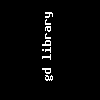
Exemple #1 Exemple avec imagestringup()
<?php
// Création d'une image de 100*100 pixels
$im = imagecreatetruecolor(100, 100);

// Dessine un texte
$textcolor = imagecolorallocate($im, 0xFF, 0xFF, 0xFF);
imagestringup($im, 3, 40, 80, 'gd library', $textcolor);

// Sauvegarde l'image
imagepng($im, './stringup.png');
?>
Résultat de l'exemple ci-dessus est similaire à :
Voir aussi
- imagestring() - Dessine une chaîne horizontale
- imageloadfont() - Charge une nouvelle police
+add a note
User Contributed Notes 1 note
Anonymous 
23 years ago
