Function to get 5-sided polygon (pentagon) or star (pentagram) co-ords.
<?php
function _makeFiveSidedStar( $x, $y, $radius, $shape='polygon', $spiky=NULL ) {
$point = array() ; // new array
$angle = 360 / 5 ;
$point[0]['x'] = $x ;
$point[0]['y'] = $y - $radius ;
$point[2]['x'] = $x + ( $radius * cos( deg2rad( 90 - $angle ) ) ) ;
$point[2]['y'] = $y - ( $radius * sin( deg2rad( 90 - $angle ) ) ) ;
$point[4]['x'] = $x + ( $radius * sin( deg2rad( 180 - ( $angle*2 ) ) ) ) ;
$point[4]['y'] = $y + ( $radius * cos( deg2rad( 180 - ( $angle*2 ) ) ) ) ;
$point[6]['x'] = $x - ( $radius * sin( deg2rad( 180 - ( $angle*2 ) ) ) ) ;
$point[6]['y'] = $y + ( $radius * cos( deg2rad( 180 - ( $angle*2 ) ) ) ) ;
$point[8]['x'] = $x - ( $radius * cos( deg2rad( 90 - $angle ) ) ) ;
$point[8]['y'] = $y - ( $radius * sin( deg2rad( 90 - $angle ) ) ) ;
if( $shape == 'star' ) {
if( $spiky == NULL ) $spiky = 0.5 ; // degree of spikiness, default to 0.5
$indent = $radius * $spiky ;
$point[1]['x'] = $x + ( $indent * cos( deg2rad( 90 - $angle/2 ) ) ) ;
$point[1]['y'] = $y - ( $indent * sin( deg2rad( 90 - $angle/2 ) ) ) ;
$point[3]['x'] = $x + ( $indent * sin( deg2rad( 180 - $angle ) ) ) ;
$point[3]['y'] = $y - ( $indent * cos( deg2rad( 180 - $angle ) ) ) ;
$point[5]['x'] = $x ;
$point[5]['y'] = $y + ( $indent * sin( deg2rad( 180 - $angle ) ) ) ;
$point[7]['x'] = $x - ( $indent * sin( deg2rad( 180 - $angle ) ) ) ;
$point[7]['y'] = $y - ( $indent * cos( deg2rad( 180 - $angle ) ) ) ;
$point[9]['x'] = $x - ( $indent * cos( deg2rad( 90 - $angle/2 ) ) ) ;
$point[9]['y'] = $y - ( $indent * sin( deg2rad( 90 - $angle/2 ) ) ) ;
}
ksort( $point ) ;
$coords = array() ; // new array
foreach( $point as $pKey=>$pVal ) {
if( is_array( $pVal ) ) {
foreach( $pVal as $pSubKey=>$pSubVal ) {
if( !empty( $pSubVal ) ) array_push( $coords, $pSubVal ) ;
}
}
}
return $coords ;
}
$values = _makeFiveSidedStar( 100, 100, 50, 'star' ) ;
?>imagepolygon
(PHP 4, PHP 5, PHP 7, PHP 8)
imagepolygon — 多角形を描画する
説明
PHP 8.0.0 以降のシグネチャ(名前付き引数をサポートしていません)
代替のシグネチャ (PHP 8.1.0 以降は非推奨)
imagepolygon() は、指定した
image に多角形を作成します。
パラメータ
image- imagecreatetruecolor()のような画像作成関数が返す GdImage オブジェクト。
points-
多角形の頂点からなる PHP の配列で、 次のようになります。
points[0] = x0 points[1] = y0 points[2] = x1 points[3] = y1 num_points-
頂点の総数。最小でも3でなければなりません。
代替のシグネチャ(PHP 8.0.0 以降) でこの引数が省略された場合、pointsは偶数でなければいけません。また、num_pointsはcount($points)/2であると仮定されます。 color-
imagecolorallocate() で作成された色識別子。
変更履歴
| バージョン | 説明 |
|---|---|
| 8.1.0 |
引数 num_points は、推奨されなくなりました。
|
| 8.0.0 |
image は、
GdImage
クラスのインスタンスを期待するようになりました。
これより前のバージョンでは、有効な gd resource が期待されていました。
|
例
例1 imagepolygon() の例
<?php
// 空の画像を生成します
$image = imagecreatetruecolor(400, 300);

// 多角形の色を選択します
$col_poly = imagecolorallocate($image, 255, 255, 255);

// 多角形を描画します
imagepolygon($image, array(
        0,   0,
        100, 200,
        300, 200
    ),
    3,
    $col_poly);

// 画像を出力します
header('Content-type: image/png');

imagepng($image);
?>
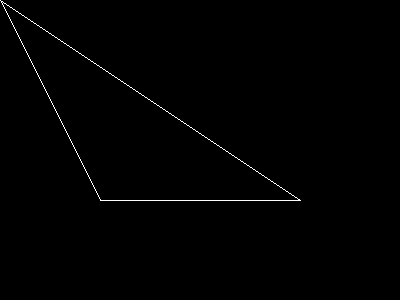
上の例の出力は、 たとえば以下のようになります。
参考
- imagefilledpolygon() - 塗りつぶした多角形を描画する
- imageopenpolygon() - オープンポリゴンを描画する
- imagecreate() - パレットを使用する新規画像を作成する
- imagecreatetruecolor() - TrueColor イメージを新規に作成する
+add a note
User Contributed Notes 3 notes
tatlar at yahoo dot com 
19 years ago
licson0729 at gmail dot com 
14 years ago
Function to draw a n-sided regular polygon

<?php
$img = imagecreatetruecolor(1360,768);

function regularPolygon($img,$x,$y,$radius,$sides,$color)
{
    $points = array();
    for($a = 0;$a <= 360; $a += 360/$sides)
    {
        $points[] = $x + $radius * cos(deg2rad($a));
        $points[] = $y + $radius * sin(deg2rad($a));
    }
    return imagepolygon($img,$points,$sides,$color);
}

regularPolygon($img,1360/2,768/2,300,8,0xffffff);//Test draw

header('Content-type: image/png');
imagepng($img);
imagedestroy($img);
?>
jsnell at networkninja dot com 
25 years ago
Here are some handy routines for rotation and translation of polygons.  Scaling could be added easily as well.

<?php
function translate_point(&$x,&$y,$angle,$about_x,$about_y,$shift_x,$shift_y)
{
    $x -= $about_x;
    $y -= $about_y;
    $angle = ($angle / 180) * M_PI;
/* math:
[x2,y2] = [x,  *  [[cos(a),-sin(a)],
           y]      [sin(a),cos(a)]]
==>
x = x * cos(a) + y*sin(a)
y = x*-sin(a) + y*cos(a)
*/

    $new_x = $x * cos($angle) - $y * sin($angle);
    $new_y = $x * sin($angle) + $y * cos($angle);
    $x = $new_x+ $about_x + $shift_x ;
    $y = $new_y + $about_y + $shift_y;
}

function translate_poly($point_array, $angle, $about_x, $about_y,$shift_x,$shift_y)
{
    $translated_poly = Array();
    while(count($point_array) > 1)
    {
        $temp_x = array_shift($point_array);
        $temp_y = array_shift($point_array);
        translate_point($temp_x, $temp_y, $angle, $about_x, $about_y,$shift_x, $shift_y);
        array_push($translated_poly, $temp_x);
        array_push($translated_poly, $temp_y);
    }
    return $translated_poly;
}
?>