The bug reported by 'michi at marel dot at' also exists in PHP version 5.1.1. This functions just works with vertical lines!imagedashedline
(PHP 4, PHP 5, PHP 7, PHP 8)
imagedashedline — Kesikli çizgi çizer
Açıklama
Bu işlevin kullanımı önerilmemektedir. Yerine imagesetstyle() ve imageline() çiftini kullanın.
Bağımsız Değişkenler
görüntüimagecreatetruecolor() gibi bir görüntü oluşturma işlevinden dönen bir GdImage nesnesi.
x1-
Sol üst köşenin X konumu.
y1-
Sol üst köşenin Y konumu. Görüntünün sol üst köşesinin koordinatları 0, 0'dır.
x2-
Sağ alt köşenin X konumu.
y2-
Sağ alt köşenin Y konumu.
renk-
Dolgu rengi. imagecolorallocate() işlevi le oluşturulmuş bir renk tanıtıcı.
Sürüm Bilgisi
| Sürüm: | Açıklama |
|---|---|
| 8.0.0 |
görüntü bağımsız değişkeninde artık
bir GdImage nesnesi aktarmak gerekiyor; evvelce
resource türünde geçerli bir gd değeri
gerekirdi.
|
Örnekler
Örnek 1 - imagedashedline() örneği
<?php
// 100x100 bir tuval oluşturalım
$im = imagecreatetruecolor(100, 100);
$white = imagecolorallocate($im, 0xFF, 0xFF, 0xFF);

// Dikine bir kesikli çizgi çizelim
imagedashedline($im, 50, 25, 50, 75, $white);

// Görüntüyü kaydedelim
imagepng($im, './dashedline.png');
imagedestroy($im);
?>
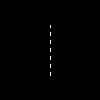
Yukarıdaki örnek şuna benzer bir çıktı üretir:
Örnek 2 - Başka bir imagedashedline() örneği
<?php
// 100x100 bir tuval oluşturalım
$im = imagecreatetruecolor(100, 100);
$white = imagecolorallocate($im, 0xFF, 0xFF, 0xFF);

// Çizgi tarzını taımlayalım: İlk dört piksel beyaz,
// sonraki dört piksel renksiz. Bu, kesikli çizgi etkisi verir.
$style = Array(
                $white,
                $white,
                $white,
                $white,
                IMG_COLOR_TRANSPARENT,
                IMG_COLOR_TRANSPARENT,
                IMG_COLOR_TRANSPARENT,
                IMG_COLOR_TRANSPARENT
                );

imagesetstyle($im, $style);

// Kesikli çizgimizi çizelim
imageline($im, 50, 25, 50, 75, IMG_COLOR_STYLED);

// Görüntüyü kaydedelim
imagepng($im, './imageline.png');
imagedestroy($im);
?>
Ayrıca Bakınız
- imagesetstyle() - Çizgi tarzını ayarlar
- imageline() - Bir çizgi çizer
+add a note
User Contributed Notes 5 notes
ProfessorNeo at gmx dot de 
20 years ago
tgabor72 at freemail dot hu 
15 years ago
You can use the imagepatternedline() function with extra features instead of imagedashedline() to give a visible dashedlines and other any kind of patterned lines on your images. The routine also manages the thickness of the line. Have fun!

<?php
// imagepatternedline() function
// Routine was developed to draw any kind of straight line with thickness. Routine uses imageline() function to draw line.
// Parameters are (similar to imageline() function):
//   $image: (resource) imagefile
//   $xstart, $ystart: (int) x,y coordinates for first point
//   $xend, $yend: (int) x,y coordinates for last point
//   $color: (int) color identifier that created with imagecolorallocate()
// extra parameters:
//   $thickness: (int) thickness of line in pixel
//   $pattern: (string) pattern of line, which repeats continuously while line is being drawed.
//   If there is '1' in the pattern that means the actual dot of line is visible,
//   '0' means dot is not visible (space between two line elements).
//   All characters regard for one pixel. Default: 1 dot wide dashed line with 4-4 dots and spaces.
// Examples for pattern:
// "1" or "" continuous line
// "10" close dotline
// "10000" dotline
// "111111110000001100000011111111" dotline for design drawing
// "111111111100000011000000110000001111111111" double dotline
// some examples for using imagepatternedline():
// imagepatternedline($image,300,300,442,442,$color,200,""); // a square with 200 length of edge and rotated 45 degrees
// imagepatternedline($image,100,200,289,200,$color,100,
//  "11001100000011001111000011001111110000001100001100"
// ."00001111001100111100000011000000110000110011001100"
// ."11000011111100111111000011001111001111000011110000"
// ."1111001111110011000011000000001100110011"); // barcode

function imagepatternedline($image, $xstart, $ystart, $xend, $yend, $color, $thickness=1, $pattern="11000011") {
   $pattern=(!strlen($pattern)) ? "1" : $pattern;
   $x=$xend-$xstart;
   $y=$yend-$ystart;
   $length=floor(sqrt(pow(($x),2)+pow(($y),2)));
   $fullpattern=$pattern;
   while (strlen($fullpattern)<$length) $fullpattern.=$pattern;
   if (!$length) {
      if ($fullpattern[0]) imagefilledellipse($image, $xstart, $ystart, $thickness, $thickness, $color);
      return;
   }
   $x1=$xstart;
   $y1=$ystart;
   $x2=$x1;
   $y2=$y1;
   $mx=$x/$length;
   $my=$y/$length;
   $line="";
   for($i=0;$i<$length;$i++){
      if (strlen($line)==0 or $fullpattern[$i]==$line[0]) {
         $line.=$fullpattern[$i];
      }else{
         $x2+=strlen($line)*$mx;
         $y2+=strlen($line)*$my;
         if ($line[0]) imageline($image, round($x1), round($y1), round($x2-$mx), round($y2-$my), $color);
         $k=1;
         for($j=0;$j<$thickness-1;$j++) {
            $k1=-(($k-0.5)*$my)*(floor($j*0.5)+1)*2;
            $k2= (($k-0.5)*$mx)*(floor($j*0.5)+1)*2;
            $k=1-$k;
            if ($line[0]) {
               imageline($image, round($x1)+$k1, round($y1)+$k2, round($x2-$mx)+$k1, round($y2-$my)+$k2, $color);
               if ($y) imageline($image, round($x1)+$k1+1, round($y1)+$k2, round($x2-$mx)+$k1+1, round($y2-$my)+$k2, $color);
               if ($x) imageline($image, round($x1)+$k1, round($y1)+$k2+1, round($x2-$mx)+$k1, round($y2-$my)+$k2+1, $color);
            }
         }
         $x1=$x2;
         $y1=$y2;
         $line=$fullpattern[$i];
      }
   }
   $x2+=strlen($line)*$mx;
   $y2+=strlen($line)*$my;
   if ($line[0]) imageline($image, round($x1), round($y1), round($xend), round($yend), $color);
   $k=1;
   for($j=0;$j<$thickness-1;$j++) {
      $k1=-(($k-0.5)*$my)*(floor($j*0.5)+1)*2;
      $k2= (($k-0.5)*$mx)*(floor($j*0.5)+1)*2;
      $k=1-$k;
      if ($line[0]) {
         imageline($image, round($x1)+$k1, round($y1)+$k2, round($xend)+$k1, round($yend)+$k2, $color);
         if ($y) imageline($image, round($x1)+$k1+1, round($y1)+$k2, round($xend)+$k1+1, round($yend)+$k2, $color);
         if ($x) imageline($image, round($x1)+$k1, round($y1)+$k2+1, round($xend)+$k1, round($yend)+$k2+1, $color);
      }
   }
}
?>
alien-scripts.de 
20 years ago
I make my own dashedline:

<?
for($l=50;$l<=550;$l+=5)
   {
    if($da == 0) { $da = 1; }
    elseif($da == 1){
    imageline($bild,$l,50,$l+5,50,$green);
    $da = 0; }
   }
?>

$l is the x-value
and we have a dashed line :)
michi at marel dot at 
22 years ago
There's a bug till PHP 4.0.4 in this function. You can only draw vertical dashed lines. To draw other dashed lines you can set <ImageSetStyle> to a special dashed line and draw it by <ImageLine>.

Sample code:
<?php
function MDashedLine($image, $x0, $y0, $x1, $y1, $fg, $bg)
{
        $st = array($fg, $fg, $fg, $fg, $bg, $bg, $bg, $bg);
        ImageSetStyle($image, $st);
        ImageLine($image, $x0, $y0, $x1, $y1, IMG_COLOR_STYLED);
}
?>